
Setting Up Signal House Browser Calling — Step-by-Step Guide
Soft Phone
This is a record of the exact steps that got a working test call running from a browser tab, using Signal House Voice. Follow this in order to redo it on another computer, or to remember what each step was for.
Note: A macbook was used to integrate and create server along with Nodejs. If you're using windows, you can replicate this using Claude or GPT.
Before you start: you need a Signal House account with an API key and at least one Voice-enabled phone number. (Sign up at https://app2.signalhouse.io/register if you don't have one yet.)
Step 1 — Create a project folder
Open Terminal and run:
mkdir ~/Desktop/signalhouse-voice-demo
cd ~/Desktop/signalhouse-voice-demo
Your terminal prompt should now show signalhouse-voice-demo instead of ~, confirming you're inside the new folder.
Step 2 — Save the API key into a .env file
nano .envType this on one single line, with your real key immediately after the = and no space:
SH_API_KEY=your_real_api_key_hereSave and exit nano: Control + O, then Enter, then Control + X.
Common mistake to watch for: if you paste just the raw key without typing
SH_API_KEY=first, the file ends up containing only the key by itself — and nothing will be able to find it. Always make sure the line literally starts withSH_API_KEY=right before the key, with no line break in between. You can sanity-check the very start of the file (without exposing the whole key) with:head -c 30 .env | cat -etIt should show
SH_API_KEY=followed by the start of your key.
Step 3 — Create package.json
nano package.jsonPaste in:
{
  "name": "signalhouse-voice-demo",
  "version": "1.0.0",
  "private": true,
  "type": "module",
  "scripts": {
    "build": "esbuild src/app.js --bundle --outfile=public/bundle.js",
    "start": "npm run build && node server.js"
  },
  "dependencies": {
    "@signalhousellc/sdk": "^1.0.66",
    "jssip": "^3.13.0",
    "express": "^4.19.2",
    "dotenv": "^16.4.5"
  },
  "devDependencies": {
    "esbuild": "^0.23.0"
  }
}
Save and exit: Control + O, Enter, Control + X.
Step 4 — Make sure Node.js is installed
Check first:
node -v
npm -v
If you get "command not found," install Node.js:
Go to https://nodejs.org
Download and open the LTS version's installer.
Click through: Continue → Continue → Agree → Install → Close.
Close and reopen Terminal, then
cdback into the project folder and re-checknode -v/npm -v.
Step 5 — Install the SDK and other packages
npm installYou should see it finish with something like added 42 packages in 3s. Ignore the "vulnerabilities" and "new npm version" notices — those are routine.
If npm warns that some packages' install scripts weren't run (npm warn install-scripts), approve them so everything (especially the bundler, esbuild) works correctly:
npm install-scripts ls
npm install-scripts approve @signalhousellc/sdk
npm install-scripts approve esbuild
Step 6 — Create server.js
nano server.js// This is the ONLY place your API key ever gets used. It never goes to the browser.
import "dotenv/config";
import express from "express";
import path from "path";
import { fileURLToPath } from "url";
import { SignalHouseSDK } from "@signalhousellc/sdk";
const __dirname = path.dirname(fileURLToPath(import.meta.url));
const app = express();
app.use(express.json());
app.use(express.static(path.join(__dirname, "public")));
if (!process.env.SH_API_KEY || process.env.SH_API_KEY === "your_signal_house_api_key_here") {
console.warn("No API key found. Check your .env file.");
}
const signalHouse = new SignalHouseSDK({
apiKey: process.env.SH_API_KEY,
baseUrl: "https://v2.signalhouse.io",
});
// The browser calls this to get a temporary "access pass" (token).
// Your real API key never leaves this server.
app.post("/token", async (req, res) => {
try {
const { data } = await signalHouse.voice.tokens.create({
tokenData: { identity: "demo-user", ttl: 1800 },
});
res.json(data);
} catch (err) {
console.error("Token error:", err?.response?.data || err.message);
res.status(500).json({
error: "Could not create a token. Double-check SH_API_KEY in your .env file.",
});
}
});
const PORT = process.env.PORT || 3000;
app.listen(PORT, () => {
console.log(`Open http://localhost:${PORT} in your browser to try it.`);
});Save and exit: Control + O, Enter, Control + X.
Step 7 — Create the webpage (public/index.html)
mkdir -p public src
nano public/index.html
<!DOCTYPE html>
<html lang="en">
<head>
<meta charset="UTF-8" />
<meta name="viewport" content="width=device-width, initial-scale=1.0" />
<title>Signal House Voice — Test Call</title>
<style>
body { font-family: system-ui, sans-serif; max-width: 420px; margin: 60px auto; text-align: center; color: #222; padding: 0 20px; }
input { display: block; width: 100%; box-sizing: border-box; padding: 12px; margin: 8px 0; font-size: 16px; border: 1px solid #ccc; border-radius: 6px; }
button { padding: 12px 24px; font-size: 16px; margin: 6px; cursor: pointer; border: none; border-radius: 6px; background: #5b4fe9; color: white; }
button:disabled { background: #ccc; cursor: not-allowed; }
#hangupBtn { background: #e94f4f; }
#status { margin: 20px 0; padding: 12px; background: #f4f4f8; border-radius: 8px; min-height: 20px; font-size: 14px; }
</style>
</head>
<body>
<h1>📞 Signal House Test Phone</h1>
<div id="status">Loading…</div>
<input id="fromNumber" placeholder="Your Signal House number, e.g. +19153374770" />
<input id="toNumber" placeholder="Number to call, e.g. your cell +15551234567" />
<button id="callBtn" disabled>Call</button>
<button id="hangupBtn" disabled>Hang Up</button>
<script src="bundle.js"></script>
</body>
</html>Save and exit: Control + O, Enter, Control + X.
Step 8 — Create the logic (src/app.js)
nano src/app.js// This file runs in the browser. It never sees your API key —
// it only ever talks to /token on your own server.
import { Device } from "@signalhousellc/sdk/voice-browser";
const statusEl = document.getElementById("status");
const callBtn = document.getElementById("callBtn");
const hangupBtn = document.getElementById("hangupBtn");
const toInput = document.getElementById("toNumber");
const fromInput = document.getElementById("fromNumber");
let device;
let activeCall;
function setStatus(text) {
statusEl.textContent = text;
console.log("[status]", text);
}
async function init() {
setStatus("Getting a temporary access pass from your server...");
const res = await fetch("/token", { method: "POST" });
if (!res.ok) {
const err = await res.json().catch(() => ({}));
setStatus("Error: " + (err.error || "could not get a token — is server.js running?"));
return;
}
const tokenResponse = await res.json();
device = new Device(tokenResponse);
device.on("registered", () => {
setStatus("Ready! Enter both numbers above and click Call.");
callBtn.disabled = false;
});
device.on("registrationFailed", (e) => {
setStatus("Registration failed: " + (e?.cause || "unknown error"));
});
device.on("incoming", (call) => {
setStatus("Incoming call from " + call.from + " — auto-answering...");
activeCall = call;
call.accept();
hangupBtn.disabled = false;
});
await device.register();
}
callBtn.addEventListener("click", async () => {
const to = toInput.value.trim();
const from = fromInput.value.trim();
if (!to || !from) {
setStatus("Enter both a 'from' and a 'to' number first, like +15551234567.");
return;
}
setStatus("Calling " + to + " ...");
callBtn.disabled = true;
activeCall = await device.connect({ to, from });
hangupBtn.disabled = false;
activeCall.on("accepted", () => setStatus("Connected! Pick up your other phone."));
activeCall.on("ended", () => {
setStatus("Call ended.");
callBtn.disabled = false;
hangupBtn.disabled = true;
});
});
hangupBtn.addEventListener("click", () => {
if (activeCall) activeCall.hangup();
});
init();Save and exit: Control + O, Enter, Control + X.
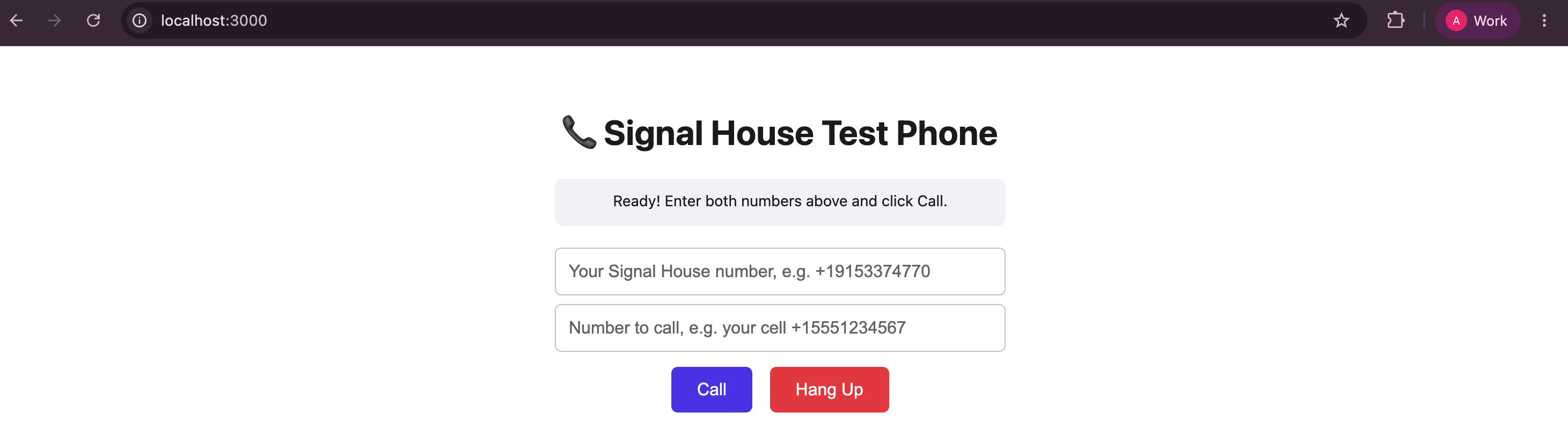
Step 9 — Start it and place the test call
npm startWait for:
Open http://localhost:3000 in your browser to try it.Then:
Open http://localhost:3000 in your browser.
Fill in your Signal House number and a number you can answer right now (like your own cell), both in
+1XXXXXXXXXXformat.Click Call, allow microphone access if your browser asks, and answer on the other phone.
That's the whole flow, start to finish.
Reference: everyday commands going forward
You don't need to redo Steps 1–8 again. To run it another time:
cd ~/Desktop/signalhouse-voice-demo
npm start
Then open http://localhost:3000 again. To stop the server, go back to that terminal and press Control + C.
Need to Chat?
Questions about your current rates or want to review pricing?
Contact Support or reach out to your account manager. We’re here to make sure your pricing works for you.